
Scope Project Roadmap GitHub Repos Releases Tutorials Video Library
Scope
This page contains information such as the specifications within the scope of the tools, high-level architectures that bring context to their applicability, features under implementation,…
Technical documentation providing context to this project can be found in the link below.
Tech: XR: 3D Scenes and Avatar Communications
A list of relevant specifications can be found in the link below.
Standards: XR Media with MPEG-I Scene Description
Features
Features implemented in the XR Unity Player
The XR Player takes 3D scenes in glTF format, supporting extensions that enable extended reality use cases. These extensions enable features such as XR anchoring, interactivity behaviors, and media pipelines.
Media pipelines
Support for media sources (eg. mp4, dash, rtp,…) exposing media buffers to the presentation engine through the MPEG_media, MPEG_accessor_timer, MPEG_buffer_circular glTF extensions.
The media pipelines APIs are designed to fetch and decode timed media such as video textures, audio sources, geometry streams,…
| Reference scene | XR Phone | XR HMD | Test content |
|---|---|---|---|
| Sample scene with media pipelines | ☑ | ☑ | studio_apartment/studio_apartment.gltf |
Video texture
Supports video textures buffers through the MPEG_texture_video glTF video extension. Video decoding is implemented by media pipelines.
| Reference scene | XR Phone | XR HMD | Test content |
|---|---|---|---|
| Sample scene with video texture | ☑ | ☑ | studio_apartment/studio_apartment.gltf |
Spatial audio
Supports audio sources positionned in 3D through the MPEG_audio_spatial.
For each audio source the extension specifies attenuation parameters controling the audio source loudness as a function of the viewer’s distance.
| Reference scene | XR Phone | XR HMD | Test content |
|---|---|---|---|
| Sample scene with spatial audio source | ☑ | ☑ | studio_apartment/studio_apartment.gltf |
Anchoring
The XR Player supports XR anchoring using the MPEG_anchor glTF extension which enables anchoring nodes and scenes to features (Trackable) tracked by the XR device. In augmented reality applications, anchored nodes are composited with the XR device’s environment.
The XR player leverages Unity’s ARFoundation to support both handled mobile devices such as smartphones and head mounted devices (HMDs).
| Trackable type | XR Phone | XR HMD | Test content |
|---|---|---|---|
| TRACKABLE_VIEWER | ☑ | ☑ | anchoring/anchorTest_viewer_n.gltf |
| TRACKABLE_FLOOR | ☑ | ☐ | awards/scene_floor_anchoring.gltf |
| TRACKABLE_PLANE | ☑ | ☑ | awards/scene_plane_anchoring.gltf |
| TRACKABLE_CONTROLLER | ☐ | ☑ | anchoring/anchorTest_ctrl_n.gltf |
| TRACKABLE_MARKER_2D | ☑ | ☐ | anchoring/anchorTest_m2D_n.gltf |
| TRACKABLE_MARKER_3D | ☐ | ☐ | anchoring/anchorTest_m3D_n.gltf |
| TRACKABLE_MARKER_GEO | ☑ | ☐ | anchoring/anchorTest_geoSpatial_n_cs.gltf |
| TRACKABLE_APPLICATION | ☑ | ☑ | anchoring/anchorTest_app_n.gltf |
Interactivity
The XR Player supports specifying interactive behaviors in a 3D scene through the MPEG_scene_interactivity and MPEG_node_interactivity glTF extensions.
An interactivity behavior combines one or more triggers that condition the execution of one or more actions.
The table below provide an overview of the supported triggers and actions:
| Trigger type | XR Phone | XR HMD | Test content |
|---|---|---|---|
| TRIGGER_COLLISION | ☑ | ☑ | gravity/gravity.gltf |
| TRIGGER_PROXIMITY | ☑ | ☑ | gravity/gravity.gltf, geometry/UseCase_03-variant1-geometry.gltf |
| TRIGGER_USER_INPUT | ☑ | ☑ | gravity/gravity.gltf, geometry/UseCase_03-variant3-geometry.gltf |
| TRIGGER_VISIBILITY | ☑ | ☑ | geometry/UseCase_03-variant3-geometry.gltf |
| Action type | XR Phone | XR HMD | Test content |
|---|---|---|---|
| ACTION_ACTIVATE | ☑ | ☑ | gravity/gravity.gltf |
| ACTION_TRANSFORM | ☑ | ☑ | gravity/gravity.gltf |
| ACTION_BLOCK | ☑ | ☑ | gravity/gravity.gltf |
| ACTION_ANIMATION | ☑ | ☑ | geometry/UseCase_03-variant1-geometry.gltf |
| ACTION_SET_MATERIAL | ☑ | ☑ | gravity/gravity.gltf |
| ACTION_MANIPULATE | ☐ | ☐ | |
| ACTION_MEDIA | ☐ | ☐ | 🚧 issues/19 |
| ACTION_HAPTIC | ☐ | ☐ | |
| ACTION_SET_AVATAR | ☐ | ☐ | issues/203 |
MPEG extensions to glTF implemented in Unity Player and Unity Editor
Note that “Unity player” refers to the compiled application, while “Unity editor” refers to the development environment which also allows running the app without actually compiling it for the target platform.
| glTF extension | Unity player | Unity editor v1.1.0 |
|---|---|---|
| MPEG_media | ☑ | ☐ |
| MPEG_buffer_circular | ☑ | ☐ |
| MPEG_accessor_timed | ☑ | ☐ |
| MPEG_audio_spatial | ☑ | ☐ |
| MPEG_texture_video | ☑ | ☐ |
| MPEG_scene_interactivity | ☑ | ☐ |
| MPEG_node_interactivity | ☑ | ☐ |
| MPEG_node_interactivity.type | ☑ | ☐ |
| MPEG_anchor | ☑ | ☐ |
| MPEG_sampler_YCbCr | ☐ | ☐ |
| MPEG_primitive_V3C | ☐ | ☐ |
| MPEG_avatar | ☐ | ☐ |
| MPEG_lights_texture_based | ☐ | ☐ |
| MPEG_light_punctual | ☐ | ☐ |
| MPEG_haptic | ☐ | ☐ |
| MPEG_mesh_linking | ☐ | ☐ |
| MPEG_scene_dynamic | ☐ | ☐ |
| MPEG_viewport_recommended | ☐ | ☐ |
| MPEG_animation_timing | ☐ | ☐ |
High-level architectures
XR Media Integration in 5G
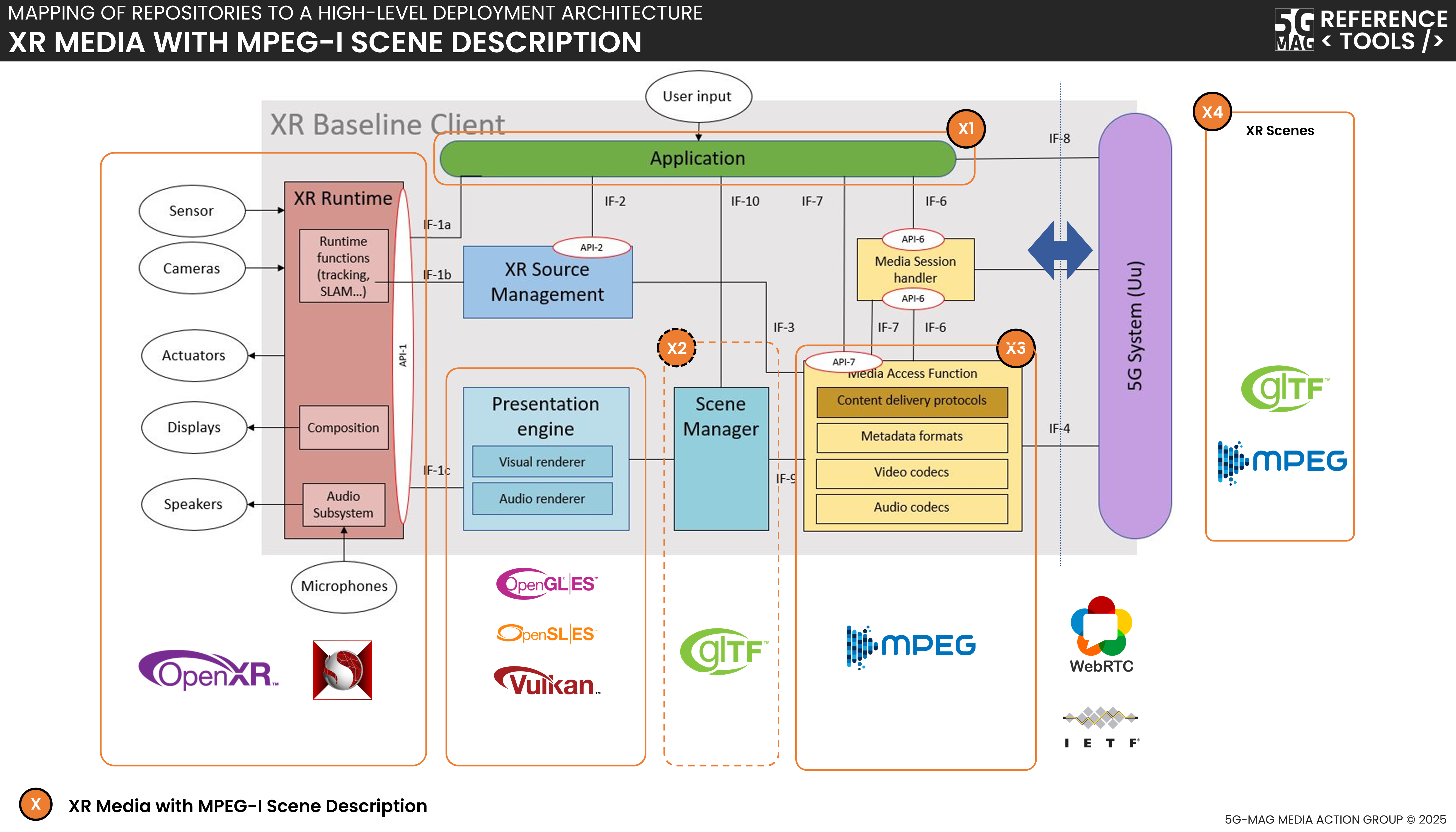
XR Media with MPEG-I SD: Repositories Common Tools: Repositories
XR Unity Player: Project overview
Scene description format
The Scene Description format standardized by ISO/IEC JTC 1/SC29/WG03 MPEG Systems in ISO/IEC 23090-14 specifies a framework enabling the composition of 3D scenes for immersive experiences, anchoring 3D assets in the real world, facilitating rich interactivity, supporting real-time media delivery.
It establishes interfaces like the Media Access Function (MAF) API to enable cross-platform interoperability, ensuring efficient retrieval and processing of media data, by decoupling the Presentation Engine from media pipeline.
XR Player implementation

The XR Player is implemented as a Unity3D project: rt-xr-unity-player.
The unity project builds on the following dependencies:
- rt-xr-glTFast: parsing and instantiating of 3D scenes in Unity.
- rt-xr-maf-native: a C++ Media Access Functions (MAF) API implementation, extensible with custom media pipeline plugins.
Test content
- rt-xr-content: test content implementing the scene description format.
See the features page for implementation status of the scene description format.
MAF API & Media pipelines
The Media Access Functions (MAF) API is specified in ISO/IEC 23090-14:2023.
It’s purpose is to decouple the presentation engine from media pipeline management, it allows the Presentation Engine to:
- pass View informations to the media pipelines (eg. to optimize fetching media )
- read media buffers updated by the media pipelines
The MAF API is protocol and codec agnostic, media can be fetched a remote URL.
Media player implementation
MediaPlayer component
The MediaPlayer component is part of the Presentation Engine layer:

The MediaPlayer component uses the MAF API implemented by Media Pipelines:

The XR Player uses a C++ implementation of the MAF API. It uses a factory / plugin pattern to allow development of media pipelines.
The mechanism by which a media pipeline is instantiated and buffers initialized, is out of the scope of ISO/IEC 23090-14.
For more on the MAF API implementation, review the rt-xr-maf-native repository.