Tutorial - Operating the MBS Function (MBSF) and APIs
The MBS Function is responsible for controlling the MBS User Services sessions. It does this by managing MBS Sessions with the MB-SMF, managing MBS Distribution Sessions with the MBSTF(s) and creating and propagating the User Service Announcements.
The initial implementation of the MBSF performs the first two tasks, managing the MB-SMF and MBSTF(s), but does not implement the Service Announcement at this time.
The MBSF is configured by an Application Provider using the API at reference point Nmb10. This tutorial covers the use of the APIs at Nmb10 to configure the MBSF.
Tutorial videos
Architecture
---
title: "MBSTF and associated 5G NFs"
config:
  block:
    padding: 12
    useMaxWidth: true
---
block-beta
    columns 9
    block: g1:7
        columns 7
        space:3 text1["5MBS reference points"] space:3
        space:4 NEF["NEF"]:3
        space:7
        AMF["AMF"] space SMF["SMF"] space MBSMF["MB-SMF"] space MBSF["MBSF"]
        space:7
        RAN["NG-RAN"] space UPF["UPF"] space MBUPF["MB-UPF"] space MBSTF["MBSTF"]
        invis1((" ")) space:3 invis2((" ")) space:2
    end
    space AP["MBS Application Provider\n(AF/AS)"]
    NEF-- "N29mb" ---MBSMF
    NEF-- "Nmb5" ---MBSF
    MBSF-- "Nmb1" ---MBSMF
    MBSMF-- "N16mb" ---SMF
    MBSF-- "Nmb2" ---MBSTF
    MBSMF-- "N4mb" ---MBUPF
    MBSTF-- "Nmb9" ---MBUPF
    MBUPF-- "N19mb" ---UPF
    SMF-- "N4" ---UPF
    SMF-- "N11" ---AMF
    UPF-- "N3" ---RAN
    AMF-- "N2" ---RAN
    MBUPF---invis2
    invis2-- "N3mb" ---invis1
    invis1---RAN
    AP-- "N33" ---NEF
    AP-- "Nmb10" ---MBSF
    AP-- "Nmb8" ---MBSTF
    style invis1 fill: #0000, stroke: #0000, color: #0000
    style invis2 fill: #0000, stroke: #0000, color: #0000
    style text1 fill: #0000, stroke: #0000
Prerequisites
This tutorial assumes that you have cloned and built the rt-mbs-function repository and rt-mbs-transport-function repository.
A 5G Core with UDP tunnelling should be running for these examples (unless using the netcat package to fake an MB-UPF UDP tunnel) with at least the NRF, SCP, MB-SMF, MB-UPF and MB-AMF Network Functions (see the instructions in our Open5GS 5MBS branch).
For convenience we are providing a bash script that starts all required components including the MBSTF, 5GC NFs and Media Server using tmux. The instructions to use the script can be found here. If you use the script you can omit some of the steps in this tutorial.
Description
In this tutorial we will cover the configuration of the MBSF via the APIs at reference point Nmb10. The configuration is split into 2 main areas, the MBS User Services and the MBS User Data Ingest Sessions.
We will be using the curl command line tool to send HTTP requests to the API. However, if you prefer a graphical user interface to trigger the calls we are also offering an Insomnia collection. When using the Insomnia collection, please remind to set the Preferred HTTP version to HTTP/2 PriorKnowledge.
---
title: "MBSF Configuration"
config:
  class:
    hideEmptyMembersBox: true
---
classDiagram
    class MbsUsrSvc["MBS User Service"]
    class MbsUsrIngSess["MBS User Data Ingest Session"]
    class MbsDistSess["MBS Distribution Session"]
    MbsUsrSvc "1" --> "*" MbsUsrIngSess
    MbsUsrIngSess "1" --* "*" MbsDistSess
The MBS User Service contains high level metadata about the Media Service being provided and may have multiple MBS User Data Ingest Sessions attached to it.
The MBS User Data Ingest Session contains one or more MBS Distribution Session descriptions and is attached to an MBS User Service.
An MBS Distribution Session contains the information that will tell an MBSTF how to receive a media stream and send it on the User Plane.
Running the MBSF for this tutorial
Copy the following into a local-mbsf.yaml file:
global:
    max:
      ue: 128

logger:
    level: debug

mbsf:
    sbi:
      server:
        - address: 127.0.0.68
          port: 7777
      client:
        scp:
          - uri: http://127.0.0.200:7777
        nrf:
          - uri: http://127.0.0.10:7777
    mbsUserServices:
      - addr: 127.0.0.68
        port: 7777
    mbsUserDataIngestSession:
      - addr: 127.0.0.68
        port: 7777
    serverResponseCacheControl:
      - maxAge: 60
        mbsUserServiceMaxAge: 60
        mbsUserDataIngestSessionMaxAge: 60
    activeDistributionSessionsSoftLimit: 1000
    activeUserServicesSoftLimit: 50
    actPeriodGoToEstablishedState: 60
With an MBS aware 5G Core running, and an MBSTF running (see above in Prerequisites), the MBSF can be started with our tutorial configuration.
/usr/local/bin/open5gs-mbsfd -c local-mbsf.yaml
MBS User Service Operations
The following sections cover the operations that can be performed on MBS User Services via the Nmb10 API. The operations covered are Create, Update, Retrieve and Delete. For that purpose we will be using the curl command line tool to send HTTP requests to the API. However, if you prefer a graphical user interface to trigger the calls we are also offering an Insomnia collection. You can find the collection here.
Create MBS User Service
This operation sends an MBSUserService (TS 29.580 Clause 6.1.6.2.2), to create a new MBS User Service, to the API with a .../nmbsf-mbs-us/v1/mbs-user-services path suffix. If the Create operation is successful then a 201 Created response will be sent with the new MBS User Service resource location in the Location HTTP header.
Create a mbs-user-service.json file with the following contents:
{
  "extServiceIds": ["https://example.broadcaster.com/services/first-service"],
  "servType": "MULTICAST",
  "servClass": "urn:oma:bcast:oma_bsc:st:1.0",
  "servAnnModes": ["VIA_MBS_5", "VIA_MBS_DISTRIBUTION_SESSION", "PASSED_BACK"],
  "servNameDescs": [
    {
      "servName": "First Service",
      "servDescrip": "The first service, operated by Example Broadcaster, is our general entertainment channel",
      "language": "eng"
    }
  ],
  "mainServLang": "eng"
}
The fields above represent:
- extServiceIds
- An array of external service identifiers so that this service can be correlated to the same service received from another network.
- servType
- The type of service,
MULTICASTorBROADCAST.
- The type of service,
- servClass
- The OMA BCast Service Class for this service.
- servAnnModes
- A array of one or more Service Announcement publication modes from the list of:
VIA_MBS_5- Service announcement is provided via reference point Mbs5 when an MBS client on the UE requests it.VIA_MBS_DISTRIBUTION_SESSION- The Service Announcement is carried on the Service Announcement channel of the MBS Service.PASSED_BACK- The Service Announcement is passed back to the Application Provider for private distribution via Mbs8.
- A array of one or more Service Announcement publication modes from the list of:
- servNameDescs
- An array of service name descriptions in different languages:
- servName contains a short service name in the language denoted by language.
- servDescrip is a description of the service in the language denoted by language.
- language The language used for servName and servDescrip.
- Note: there must be at least one of servName or servDescrip.
- An array of service name descriptions in different languages:
- mainServLang
- The main language of this service.
This file can be sent as a Create MBS User Service request using the following command:
curl -v --http2-prior-knowledge -H 'Content-Type: application/json' -X POST --data-binary @mbs-user-service.json http://127.0.0.68:7777/nmbsf-mbs-us/v1/mbs-user-services
If the MBSF is working correctly the response will look like:
< HTTP/2 201
< server: Open5GS v2.6.4-563-g4342250
< date: Wed, 17 Dec 2025 16:10:01 GMT
< content-length: 445
< etag: b2adb87203ec4e63b16fbd2f7e4b7dd8581870ab604af93f873e78994cc6a360
< last-modified: Wed, 17 Dec 2025 16:10:01 UTC
< cache-control: max-age=60
< server: MBSF-localhost/18 (info.title=nmbsf-mbs-us; info.version=1.1.0) rt-mbs-function/0.1.0
< location: /nmbsf-mbs-us/v1/mbs-user-services/d72a4394-db62-41f0-8e26-9174558de382
< content-type: application/json
<
{
	"extServiceIds":	["https://example.broadcaster.com/services/first-service"],
	"servType":	"MULTICAST",
	"servClass":	"urn:oma:bcast:oma_bsc:st:1.0",
	"servAnnModes":	["VIA_MBS_5", "VIA_MBS_DISTRIBUTION_SESSION", "PASSED_BACK"],
	"servNameDescs":	[{
			"servName":	"First Service",
			"servDescrip":	"The first service, operated by Example Broadcaster, is our general entertainment channel",
			"language":	"eng"
		}],
	"mainServLang":	"eng"
}
We need to make a note of the MBS User Service Id, which is found in the location: header. To make it easier for later commands we will store the Id in a shell variable. So for the example response above this would be:
mbs_user_service_id=d72a4394-db62-41f0-8e26-9174558de382
Updating an MBS User Service
The Update operation uses the same MBSUserService JSON data structure as the Create operation to replace the details of an existing MBS User Service. This is done using a PUT request to the API URL ending in .../nmbsf-mbs-us/v1/mbs-user-services/{mbs_user_service_id}.
To demonstrate this we will take a copy of mbs-user-service.json as mbs-user-service-altered.json and change the "servDescrip" attribute to "The description has been changed!" to change the service description.
The update to the MBS User Service can be requested using the following command:
curl -v --http2-prior-knowledge -H 'Content-Type: application/json' -X PUT --data-binary @mbs-user-service-altered.json http://127.0.0.68:7777/nmbsf-mbs-us/v1/mbs-user-services/${mbs_user_service_id}
The response will look like:
< HTTP/2 200
< server: Open5GS v2.6.4-563-g4342250
< date: Wed, 17 Dec 2025 16:43:59 GMT
< content-length: 390
< server: MBSF-localhost/18 (info.title=nmbsf-mbs-us; info.version=1.1.0) rt-mbs-function/0.1.0
< location: /nmbsf-mbs-us/v1/mbs-user-services/d72a4394-db62-41f0-8e26-9174558de382
< content-type: application/json
< etag: b2adb87203ec4e63b16fbd2f7e4b7dd8581870ab604af93f873e78994cc6a360
< last-modified: Wed, 17 Dec 2025 16:10:01 UTC
< cache-control: max-age=60
<
{
	"extServiceIds":	["https://example.broadcaster.com/services/first-service"],
	"servType":	"MULTICAST",
	"servClass":	"urn:oma:bcast:oma_bsc:st:1.0",
	"servAnnModes":	["VIA_MBS_5", "VIA_MBS_DISTRIBUTION_SESSION", "PASSED_BACK"],
	"servNameDescs":	[{
			"servName":	"First Service",
			"servDescrip":	"The description has been changed!",
			"language":	"eng"
		}],
	"mainServLang":	"eng"
}
Retrieving an MBS User Service
An MBSUserService JSON data structure can be retrieved for a given MBS User Service Id by doing an HTTP GET request to the API URL ending in .../nmbsf-mbs-us/v1/mbs-user-services/{mbs_user_service_id}.
This can be done using the following command:
curl -v --http2-prior-knowledge -X GET http://127.0.0.68:7777/nmbsf-mbs-us/v1/mbs-user-services/${mbs_user_service_id}
The response will look like:
< HTTP/2 200
< server: Open5GS v2.6.4-563-g4342250
< date: Wed, 17 Dec 2025 16:48:37 GMT
< content-length: 390
< etag: b2adb87203ec4e63b16fbd2f7e4b7dd8581870ab604af93f873e78994cc6a360
< last-modified: Wed, 17 Dec 2025 16:10:01 UTC
< cache-control: max-age=60
< server: MBSF-localhost/18 (info.title=nmbsf-mbs-us; info.version=1.1.0) rt-mbs-function/0.1.0
< location: /nmbsf-mbs-us/v1/mbs-user-services/d72a4394-db62-41f0-8e26-9174558de382
< content-type: application/json
<
{
	"extServiceIds":	["https://example.broadcaster.com/services/first-service"],
	"servType":	"MULTICAST",
	"servClass":	"urn:oma:bcast:oma_bsc:st:1.0",
	"servAnnModes":	["VIA_MBS_5", "VIA_MBS_DISTRIBUTION_SESSION", "PASSED_BACK"],
	"servNameDescs":	[{
			"servName":	"First Service",
			"servDescrip":	"The description has been changed!",
			"language":	"eng"
		}],
	"mainServLang":	"eng"
}
Deleting an MBS User Service
An MBS User Service can be deleted by doing an HTTP DELETE request for the API URL ending in .../nmbsf-mbs-us/v1/mbs-user-services/{mbs_user_service_id}.
This can be done using the following command:
curl -v --http2-prior-knowledge -X DELETE http://127.0.0.68:7777/nmbsf-mbs-us/v1/mbs-user-services/${mbs_user_service_id}
Upon successful deletion of the MBS User Service, the response will be a 204 No Content and will look like:
< HTTP/2 204
< server: Open5GS v2.6.4-563-g4342250
< date: Wed, 17 Dec 2025 16:53:15 GMT
< server: MBSF-localhost/18 (info.title=nmbsf-mbs-us; info.version=1.1.0) rt-mbs-function/0.1.0
<
MBS User Data Ingest Session Operations
Create an MBS User Data Ingest Session
The MBS User Data Ingest Session contains information about which streams make up an MBS User Service.
The MBSUserDataIngSession structure (TS 29.580 clause 6.2.6.2.2) is sent using the HTTP POST method to the API URL ending .../nmbsf-mbs-ud-ingest/v1/sessions.
Example MBSUserDataIngSession structures can be found in the rt-mbs-function/tests/json directory along with a helper script to rewrite the MBS User Service Id in the files. To generate suitable MBSUserDataIngSession structures, based on the MBS User Service created in Create MBS User Service above, you can run a script in the rt-mbs-function/tests/json directory passing it the MBS User Service Id captured in the shell variable:
cd ~/rt-mbs-function
tests/json/change_serv_id.sh "$mbs_user_service_id"
A simple STREAMING object stream based on PULL requests can be configured using the obj_distr_info.updated.json file:
cd ~/rt-mbs-function
curl -v -X POST -H 'Content-Type: application/json' --http2-prior-knowledge --data-binary @tests/json/obj_distr_info.updated.json http://127.0.0.68:7777/nmbsf-mbs-ud-ingest/v1/sessions
The resulting response should be a 201 Created HTTP status code with the body containing the MBSUserDataIngSession structure, e.g.:
< HTTP/2 201
< server: Open5GS v2.6.4-563-g4342250
< date: Thu, 18 Dec 2025 15:10:20 GMT
< content-length: 779
< etag: 57cfa61265f7b63f996499206b58bfa7b968acad27aa9435505aef5d1618ae69
< last-modified: Thu, 18 Dec 2025 15:10:20 UTC
< cache-control: max-age=60
< server: MBSF-localhost/18 (info.title=nmbsf-mbs-ud-ingest; info.version=1.1.2) rt-mbs-function/0.1.0
< location: /nmbsf-mbs-ud-ingest/v1/sessions/ab8ca684-dc23-41f0-8261-a322be7890ea
< content-type: application/json
<
{
	"mbsUserServId":	"d72a4394-db62-41f0-8e26-9174558de382",
	"mbsDisSessInfos":	{
		"AP_MBS_SESSION_1":	{
			"mbsDistSessionId":	"99ba10f3-a37b-4d0c-bea5-023af9da4acb",
			"mbsDistSessState":	"INACTIVE",
			"mbsSessionId":	{
				"tmgi":	{
					"mbsServiceId":	"7CF398",
					"plmnId":	{
						"mcc":	"000",
						"mnc":	"000"
					}
				},
				"ssm":	{
					"sourceIpAddr":	{
						"ipv4Addr":	"127.0.0.5"
					},{
  "mbsUserServId": "",
  "mbsDisSessInfos": {
    "AP_MBS_SESSION_1": {
      "mbsSessionId": {
        "ssm": {
          "sourceIpAddr": {
            "ipv4Addr": "127.0.0.5"
          },
          "destIpAddr": {
            "ipv4Addr": "232.10.0.7"
          }
        }
      },
      "mbsDistSessState": "ACTIVE",
      "maxContBitRate": "10 Mbps",
      "distrMethod": "OBJECT",
      "objDistrInfo": {
        "operatingMode": "CAROUSEL",
        "objAcqMethod": "PULL",
        "objIngUri": "http://localhost:3004/",
        "objAcqIds": ["carousel"],
        "objDistrUri": "http://127.0.0.2/"
      }
    }
  },
	"suppFeat": "3"
}
					"destIpAddr":	{
						"ipv4Addr":	"232.10.0.5"
					}
				}
			},
			"maxContBitRate":	"10 Mbps",
			"distrMethod":	"OBJECT",
			"objDistrInfo":	{
				"operatingMode":	"STREAMING",
				"objAcqMethod":	"PULL",
				"objAcqIds":	["stream.mpd"],
				"objIngUri":	"https://livesim2.dashif.org/livesim2/WAVE/vectors/cfhd_sets/12.5_25_50/t1/2022-10-17/"
			}
		}
	}
}
The location: HTTP header in the response contains the MBS User Data Ingest Session Id, which we will capture in a shell variable for later use, e.g. from the example response above:
mbs_user_data_ing_session_id=ab8ca684-dc23-41f0-8261-a322be7890ea
Update an MBS User Data Ingest Session
The Update operation for an MBS User Data Ingest Session is performed by using an HTTP PUT to the API URL ending in .../nmbsf-mbs-ud-ingest/v1/session/{mbs_user_data_ing_session_id}. The body of the request is a modified MBSUserDataIngSession structure.
For this example we will change the mbsDistSessState attribute from INACTIVE to ACTIVE. To do this, edit the tests/json/obj_distr_info.updated.json file we used in the previous step to change the value of the mbsDistSessState attribute.
Once the file has been edited you can use the following command to perform the Update operation:
curl -v -X PUT -H 'Content-Type: application/json' --http2-prior-knowledge --data-binary @tests/json/obj_distr_info.updated.json "http://127.0.0.68:7777/nmbsf-mbs-ud-ingest/v1/sessions/$mbs_user_data_ing_session_id"
If successful, the response will be a 200 OK response with the new MBSUserDataIngSession structure as the body:
< HTTP/2 200
< server: Open5GS v2.6.4-563-g4342250
< date: Thu, 18 Dec 2025 15:37:35 GMT
< content-length: 777
< last-modified: Thu, 18 Dec 2025 15:10:20 UTC
< cache-control: max-age=60
< server: MBSF-localhost/18 (info.title=nmbsf-mbs-ud-ingest; info.version=1.1.2) rt-mbs-function/0.1.0
< location: /nmbsf-mbs-ud-ingest/v1/sessions/ab8ca684-dc23-41f0-8261-a322be7890ea
< content-type: application/json
< etag: 57cfa61265f7b63f996499206b58bfa7b968acad27aa9435505aef5d1618ae69
<
{
	"mbsUserServId":	"d72a4394-db62-41f0-8e26-9174558de382",
	"mbsDisSessInfos":	{
		"AP_MBS_SESSION_1":	{
			"mbsDistSessionId":	"99ba10f3-a37b-4d0c-bea5-023af9da4acb",
			"mbsDistSessState":	"ACTIVE",
			"mbsSessionId":	{
				"tmgi":	{
					"mbsServiceId":	"7CF398",
					"plmnId":	{
						"mcc":	"000",
						"mnc":	"000"
					}
				},
				"ssm":	{
					"sourceIpAddr":	{
						"ipv4Addr":	"127.0.0.5"
					},
					"destIpAddr":	{
						"ipv4Addr":	"232.10.0.5"
					}
				}
			},
			"maxContBitRate":	"10 Mbps",
			"distrMethod":	"OBJECT",
			"objDistrInfo":	{
				"operatingMode":	"STREAMING",
				"objAcqMethod":	"PULL",
				"objAcqIds":	["stream.mpd"],
				"objIngUri":	"https://livesim2.dashif.org/livesim2/WAVE/vectors/cfhd_sets/12.5_25_50/t1/2022-10-17/"
			}
		}
	}
}
Retrieve an MBS User Data Ingest Session
This operation retrieves an existing MBS User Data Ingest Session object structure from the MBSF.
To do this an HTTP GET request is sent to the API URL ending in .../nmbsf-mbs-ud-ingest/v1/session/{mbs_user_data_ing_session_id}.
curl -v --http2-prior-knowledge "http://127.0.0.68:7777/nmbsf-mbs-ud-ingest/v1/sessions/$mbs_user_data_ing_session_id"
If an MBS User Data Ingest Session can be found with the given Id then a 200 OK response will be received with the body containing the MBSUserDataIngSession structure as a JSON object.
For example:
< HTTP/2 200
< server: Open5GS v2.6.4-563-g4342250
< date: Thu, 18 Dec 2025 15:46:06 GMT
< content-length: 777
< server: MBSF-localhost/18 (info.title=nmbsf-mbs-ud-ingest; info.version=1.1.2) rt-mbs-function/0.1.0
< location: /nmbsf-mbs-ud-ingest/v1/sessions/ab8ca684-dc23-41f0-8261-a322be7890ea
< content-type: application/json
< etag: 57cfa61265f7b63f996499206b58bfa7b968acad27aa9435505aef5d1618ae69
< last-modified: Thu, 18 Dec 2025 15:10:20 UTC
< cache-control: max-age=60
<
{
	"mbsUserServId":	"d72a4394-db62-41f0-8e26-9174558de382",
	"mbsDisSessInfos":	{
		"AP_MBS_SESSION_1":	{
			"mbsDistSessionId":	"99ba10f3-a37b-4d0c-bea5-023af9da4acb",
			"mbsDistSessState":	"ACTIVE",
			"mbsSessionId":	{
				"tmgi":	{
					"mbsServiceId":	"7CF398",
					"plmnId":	{
						"mcc":	"000",
						"mnc":	"000"
					}
				},
				"ssm":	{
					"sourceIpAddr":	{
						"ipv4Addr":	"127.0.0.5"
					},
					"destIpAddr":	{
						"ipv4Addr":	"232.10.0.5"
					}
				}
			},
			"maxContBitRate":	"10 Mbps",
			"distrMethod":	"OBJECT",
			"objDistrInfo":	{
				"operatingMode":	"STREAMING",
				"objAcqMethod":	"PULL",
				"objAcqIds":	["stream.mpd"],
				"objIngUri":	"https://livesim2.dashif.org/livesim2/WAVE/vectors/cfhd_sets/12.5_25_50/t1/2022-10-17/"
			}
		}
	}
}
Delete an MBS User Data Ingest Session
To remove an MBS User Data Ingest Session the Delete operation is used. This is done using an HTTP DELETE request to the API URL ending in .../nmbsf-mbs-ud-ingest/v1/session/{mbs_user_data_ing_session_id}.
For example, you can use the command:
curl -v -X DELETE --http2-prior-knowledge "http://127.0.0.68:7777/nmbsf-mbs-ud-ingest/v1/sessions/$mbs_user_data_ing_session_id"
The response, if the MBS User Data Ingest Session can be found, will be an HTTP 204 No Content response to indicate successful deletion. This response will look like:
< HTTP/2 204
< server: Open5GS v2.6.4-563-g4342250
< date: Thu, 18 Dec 2025 15:49:20 GMT
< server: MBSF-localhost/18 (info.title=nmbsf-mbs-ud-ingest; info.version=1.1.2) rt-mbs-function/0.1.0
<
Example MBS User Data Ingest Sessions
MBS User Data Ingest Session request body including MBS Service Area
The MBSF can parse MbsServiceArea. Where a TAC is specified, the DistributionSessionInfo part of the UserDataIngSession includes the optional tgtServAreas property with the format:
"tgtServAreas": {
	"taiList": [
		{"plmnId": {"mcc": "001", "mnc": "001"}, "tac": "ABCDEF"}
	]
}
MBS User Data Ingest Session request body including Activation Periods
The MBSF can parse Activation Periods with specific time window(s) during which the broadcast/multicast session is active and transmitting data over the network.
"actPeriods": [
	{"startTime": "2026-04-07T10:29:46Z", "stopTime": "2030-04-07T23:59:59.999999Z"}
]
Repetitions can also be indicated:
"actPeriodsRepRule": {
	"startTime": "2026-04-07T10:30:00Z", "duration": 60, "repetitionInterval": 120
},
MBS User Data Ingest Session request body for CAROUSEL operating mode
The MBSF can create CAROUSEL session where the server will repeatedly cycle through and broadcast the set of files (a file carousel).
{
  "mbsUserServId": "{<mbs_user_data_ing_session_id>}",
  "mbsDisSessInfos": {
    "AP_MBS_SESSION_1": {
      "mbsSessionId": {
        "ssm": {
          "sourceIpAddr": {
            "ipv4Addr": "127.0.0.5"
          },
          "destIpAddr": {
            "ipv4Addr": "232.10.0.7"
          }
        }
      },
      "mbsDistSessState": "ACTIVE",
      "maxContBitRate": "10 Mbps",
      "distrMethod": "OBJECT",
      "objDistrInfo": {
        "operatingMode": "CAROUSEL",
        "objAcqMethod": "PULL",
        "objIngUri": "http://localhost:3004/",
        "objAcqIds": ["carousel"],
        "objDistrUri": "http://127.0.0.2/"
      }
    }
  },
	"suppFeat": "3"
}
Analysing MBS User Service Announcements
An MBS AF is co-located with the MBSF to serve User Service Announcement bundles:
- The User Service Announcement Channel is triggered when the MBS Application Provider provisions an MBS Service with the VIA_MBS_DISTRIBUTION_SESSION service announcement mode and then goes on to create an associated, active MBS User Data Ingest Session via the API at reference point Nmb10.
- MBSF publishes announcement bundle documents to a document root folder so that they are exposed by the co-located MBS AF via HTTP.
- MBSF creates a special MBS Distribution Session on an MBSTF for the User Service Announcement Carousel via reference point Nmb2.
- MBSF pushes a carousel manifest to the MBSTF via reference point MBS-11 listing User Service Announcement bundles for currently active MBS User Data Ingest Sessions.
- MBSTF retrieves these User Service Announcement bundles from the co-located MBS AF via reference point MBS-11.
- If the USER_SER_AD event type has been subscribed to by the MBS Application Provider, then a USER_SER_AD notification is sent to it via reference point Nmb10 when a new bundle is ready.
These features are configured in mbsf.yaml, including the listening addresses for the co-located MBS AF at reference points MBS-1, MBS-5 and MBS-11 and parameters of the MBS User Service Announcement Channel (repetition rate, SSM address and bit rate):
logger:
  file:
    path: /var/local/log/open5gs/mbsf.log

global:
  max:
    ue: 128  # The number of UE can be increased depending on memory size.

mbsf:
  sbi:
    server:
      - address: 127.0.0.67
        port: 7777
    client:
      scp:
        - uri: http://127.0.0.200:7777
      nrf:
        - uri: http://127.0.0.10:7777

  mbsUserServices:
    - addr: 127.0.0.67
      port: 7777

  mbsUserDataIngestSession:
    - addr: 127.0.0.67
      port: 7777

  serverResponseCacheControl:
    - defaultMaxAge: 60
      mbsUserServiceMaxAge: 60
      mbsUserDataIngestSessionMaxAge: 60

  userServiceAnnouncement:
    announcementRepetitionTime: 10000
    ssmPort: 3000
    ssmSourceAddress: 127.0.0.67
    ssmDestinationAddress: 232.0.0.1
    mbr: 10 Mbps
    docRoot: /var/local/cache/mbsf/user-service-announcements

  activeDistributionSessionsSoftLimit: 1000
  activeUserServicesSoftLimit: 50
  actPeriodGoToEstablishedState: 60

mbsaf:
  server:
    - addr: 127.0.0.67  # MBS-11 (to MBSTF)
      port: 8888
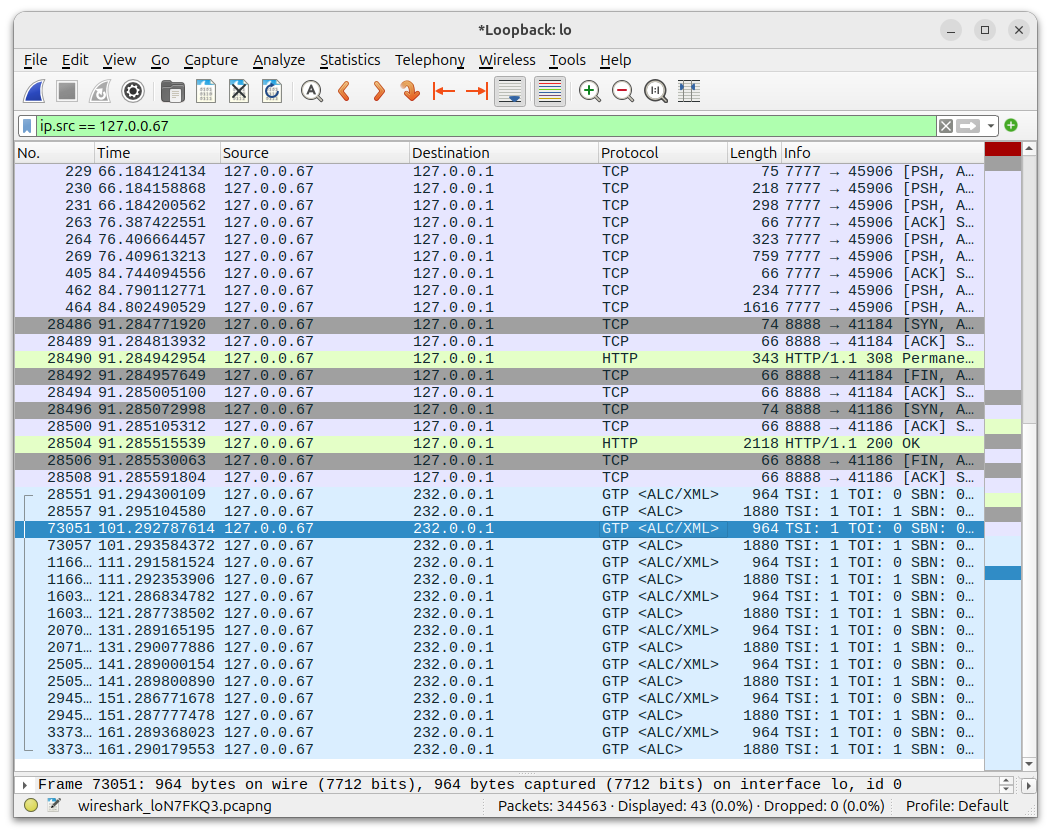
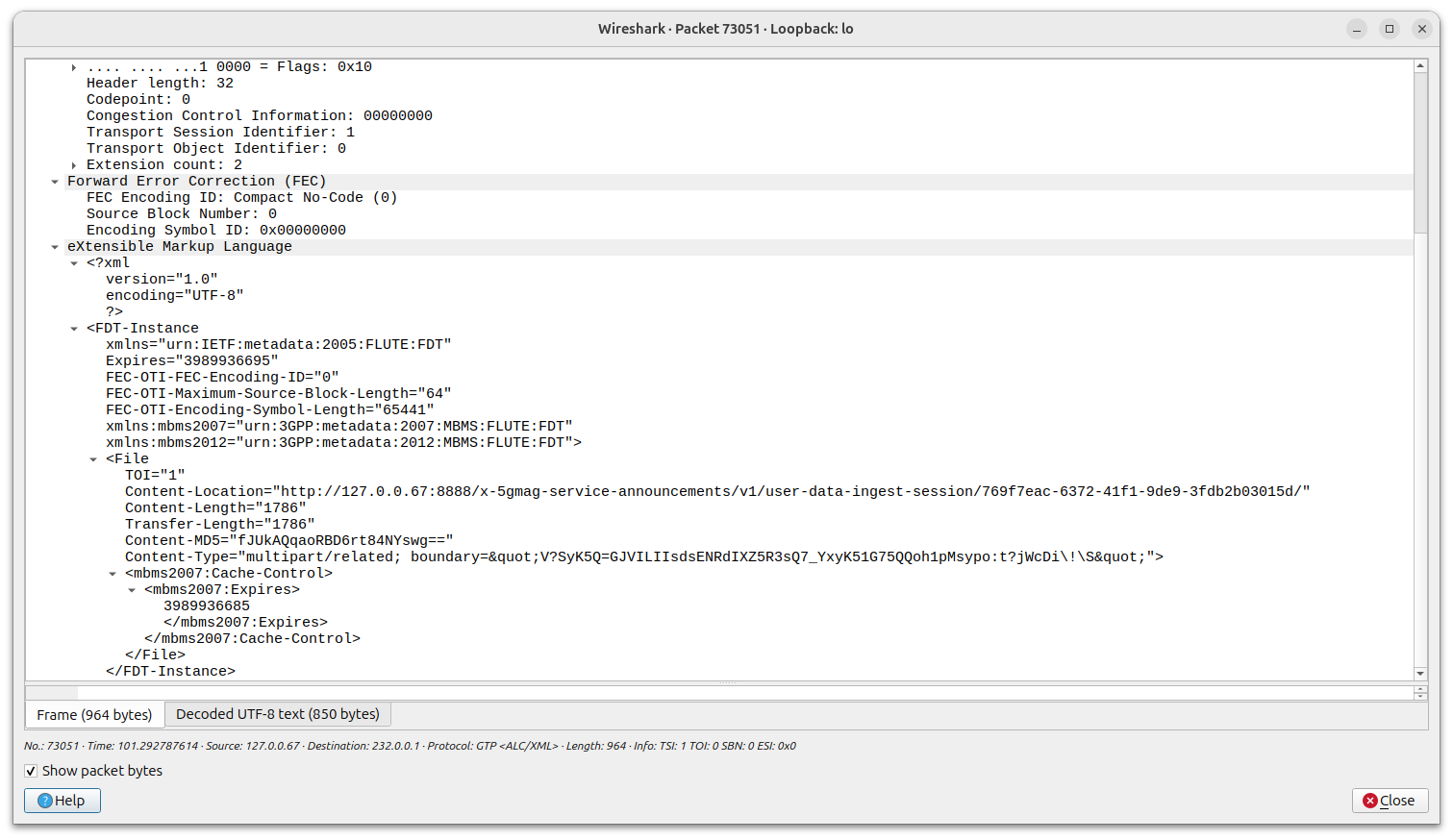
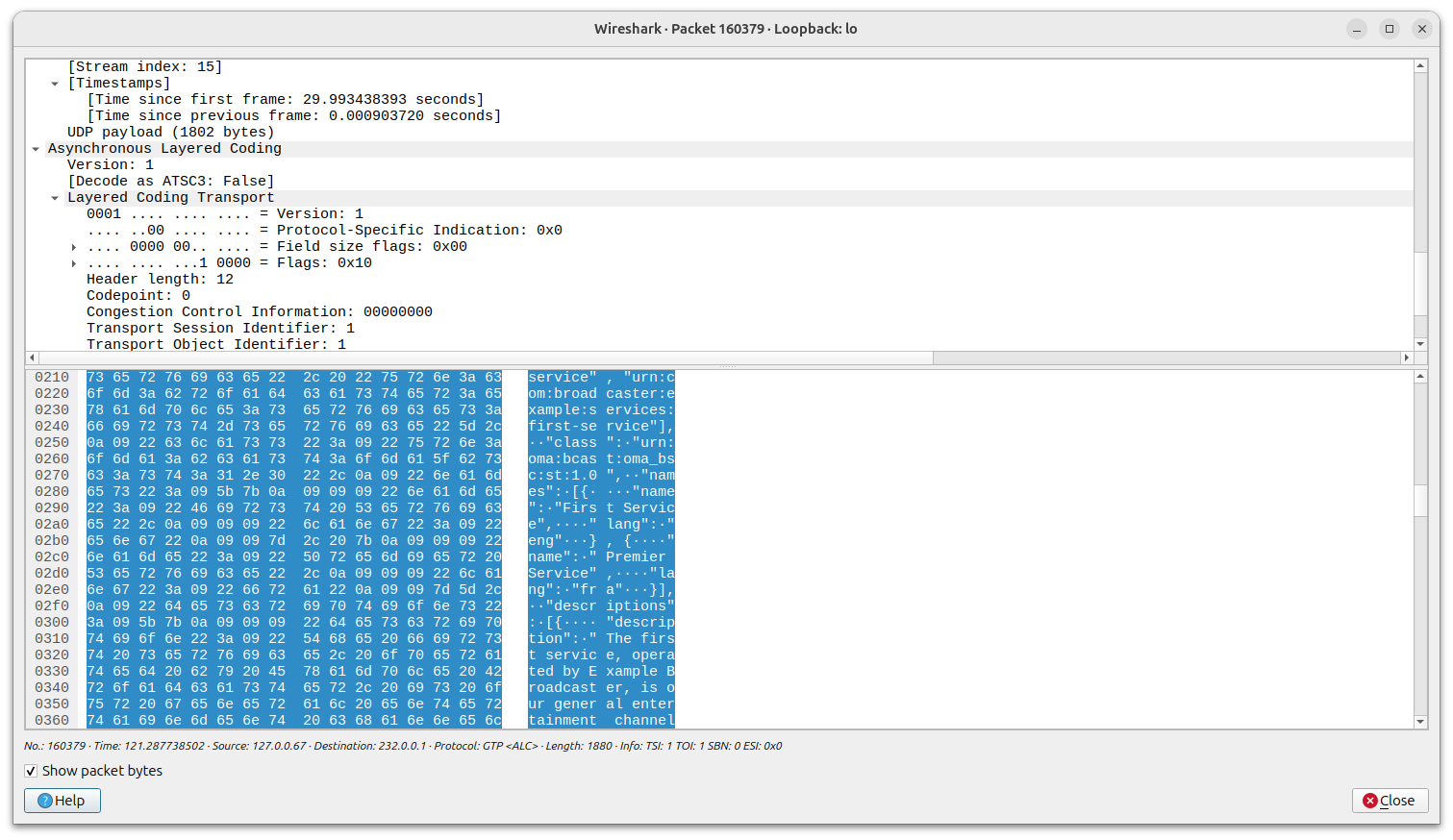
Using Wireshark it is possible to check the transmission of the service announcement every 10 seconds from 127.0.0.67 to 232.0.0.1 containing the details to fetch content and control plane information related to the MBS User Service and Data Ingest Session.