
This documentation is currently under development and subject to change. It reflects outcomes elaborated by 5G-MAG members. If you are interested in becoming a member of the 5G-MAG and actively participating in shaping this work, please contact the Project Office
Using CAMARA APIs: Quality on Demand for Content Production & Contribution
Find more information about Quality on Demand API.
Purpose
A user of a media application would like to request the creation of a QoS session for the connection between a device and an application server.
Workflow and Architecture
This is a high-level figure with the entities involing APIs and the devices involved:
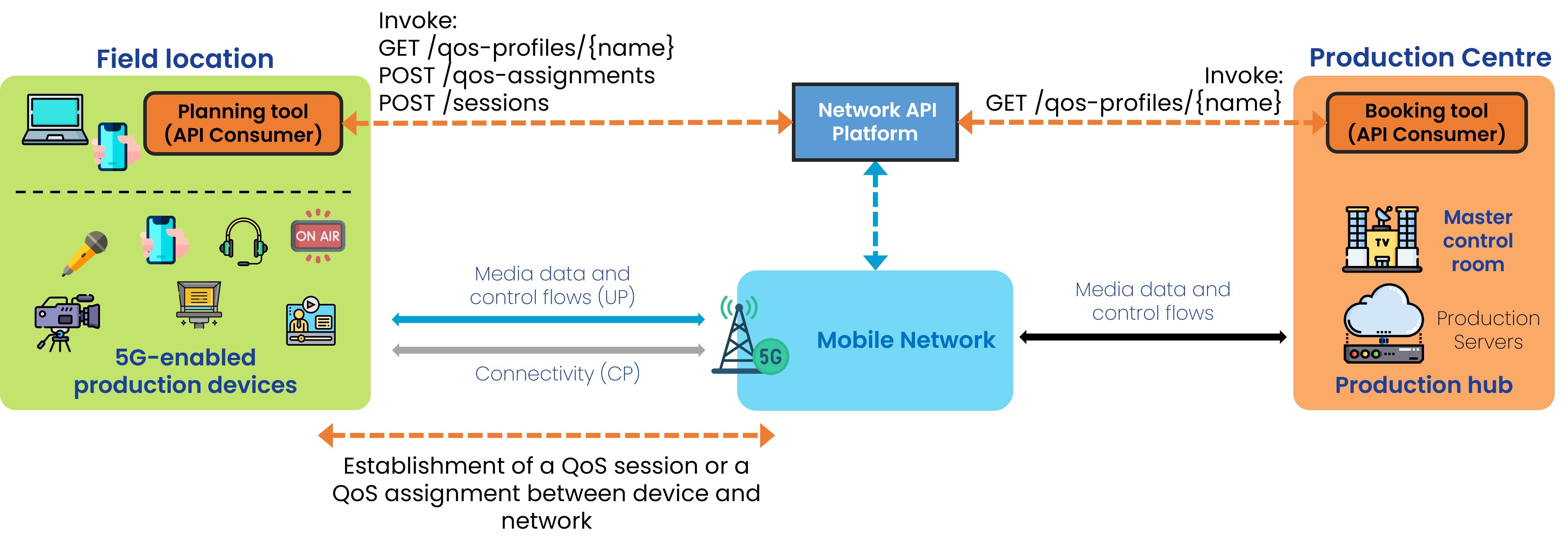
General Workflow
The following steps are executed:
- Sign up and access credentials
- Selection / Request for QoS Profiles
Step 0: Pre-conditions
- The API invoker needs to have signed up with the API provider.
- qosProfiles have already been defined and made available by the network operator.
- Names of such qosProfiles have been disclosed to the user so they can be used when invoking APIs.
Step 1: Before using the network
Details of the already arranged QoS Profile can be retrieve with GET /qos-profiles/{name}, using the QoS Profiles API.
An example of the QoS Profile, including status:
[
  {
    "name": "voice",
    "description": "QoS profile for video streaming",
    "status": "ACTIVE",
    "targetMinUpstreamRate": {
      "value": 10,
      "unit": "bps"
    },
    "maxUpstreamRate": {
      "value": 10,
      "unit": "bps"
    },
    "maxUpstreamBurstRate": {
      "value": 10,
      "unit": "bps"
    },
    "targetMinDownstreamRate": {
      "value": 10,
      "unit": "bps"
    },
    "maxDownstreamRate": {
      "value": 10,
      "unit": "bps"
    },
    "maxDownstreamBurstRate": {
      "value": 10,
      "unit": "bps"
    },
    "minDuration": {
      "value": 12,
      "unit": "Days"
    },
    "maxDuration": {
      "value": 12,
      "unit": "Days"
    },
    "priority": 20,
    "packetDelayBudget": {
      "value": 12,
      "unit": "Days"
    },
    "jitter": {
      "value": 12,
      "unit": "Days"
    },
    "packetErrorLossRate": 3,
    "l4sQueueType": "non-l4s-queue",
    "serviceClass": "real_time_interactive"
  }
]
Step 2: During operation
2.1 Requests creation of QoS session
With POST /sessions passing the device object, applicationServer IP, applicationServerPorts, devicePorts, qosProfile and duration.
2.2 Device establishes connection
2.3 Usage of API capabilities
A series of operations to delete the QoS session or extending its duration are available:
GET /sessions/{sessionId} - Get QoS session information
DELETE /sessions/{sessionId} - Delete a QoS session
POST /sessions/{sessionId}/extend - Extend the duration of an active session
POST /retrieve-sessions - Get QoS session information for a device
Step 3: Dismantling
When reaching the duration the QoS session may be teared down. A greceful way of tearing down will delete the QoS session by id.
DELETE /sessions/{sessionId} deletes a QoS session
5G-MAG’s Self-Assessment
- A session may be created by establishing a level of QoS between the device and the application server for a given duration.
- It is assumed that the QoD API is invoked with the complete knowledge of device, application server, and at the given location.
- No information is given to the user on the availability of resources in an area.
- It is not possible to ensure availability of the QoS session before invoking at the location. A service area cannot be defined/requested, it is unclear whether this would be successful or not.
- On device failure, the QoS session needs to be deleted with no guarantee that a new one can be created.
Potential improvements:
- There is no information about the location or service area.
- Understanding opportunities to book QoS sessions in terms of duration and location/area would be useful as the user may be able to move and find a better coverage spot rather than being denied the establishment of QoS at the time and location in which it is requested.