
This documentation is currently under development and subject to change. It reflects outcomes elaborated by 5G-MAG members. If you are interested in becoming a member of the 5G-MAG and actively participating in shaping this work, please contact the Project Office
Using CAMARA APIs: Dedicated Networks for Content Production & Contribution
Find more information about Dedicated Networks API.
Purpose
A user of a media application would like to request from the mobile network a set of capabilities and connectivity performance targets for a particular geographical location and time window.
Workflow and Architecture
The entities, devices and interaction within the scope of this API are illustrated in the high-level figure below.
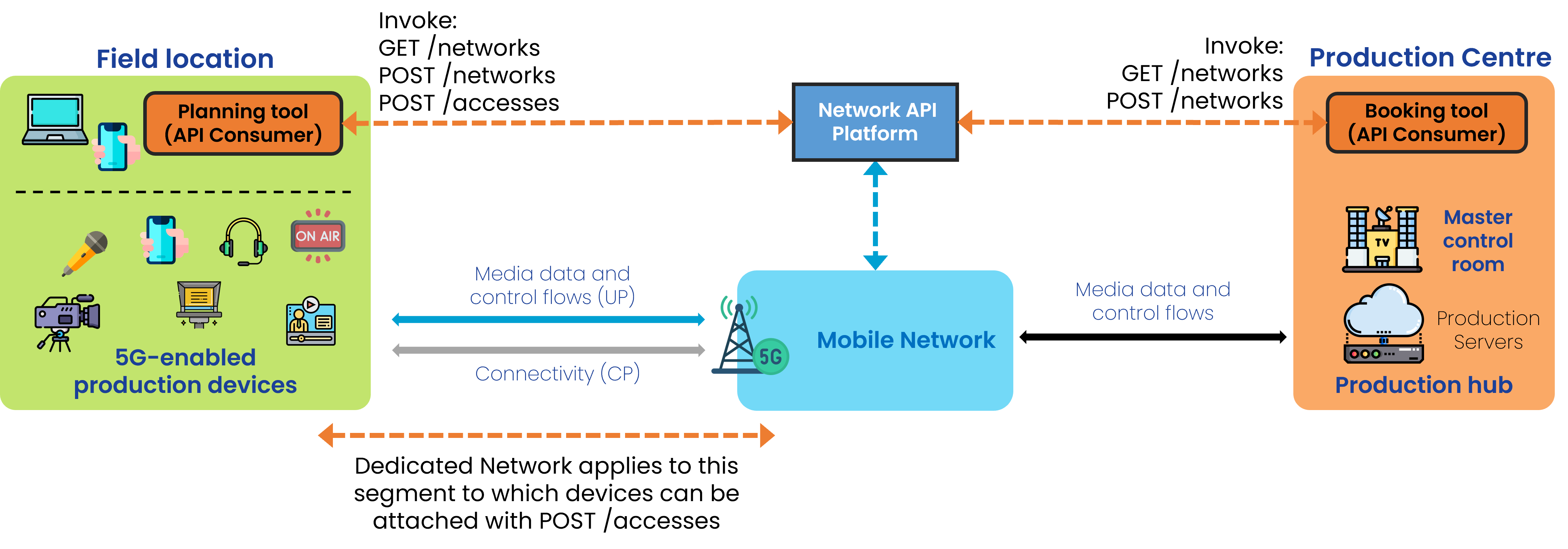
General Workflow
The lifecycle of a Dedicated Network, from the preconditions that must be met before a request can be made, all the way through to establishing the Dedicated Network itself, its use, and then the dismantling of the service is shown below:
- Sign up and access credentials
- Selection / Request for Network Profiles and Network Service Areas
Step 0: Pre-conditions
- The user (API invoker) must have registered (signed up) with the API provider.
- qosProfiles have already been defined and made available by the network operator. This is related to the QoS Profiles API.
- Dedicated Network Service Areas are created by the operator and made available. Each area is association with one or more Network Profiles.
- Network Profiles set out the maximum number of devices that can be concurrently served within the area, as well as the aggregate UL and DL throughput that the network operator can offer.
Step 1: Before using the network
1.1a. Discovery of available and eligible Network Profiles:
GET /profiles to obtain a list of dedicated network profiles with the corresponding “id”: “string”.
[
  {
    "id": "string",
    "maxNumberOfDevices": 0,
    "aggregatedUlThroughput": {
      "value": 10,
      "unit": "bps"
    },
    "aggregatedDlThroughput": {
      "value": 10,
      "unit": "bps"
    },
    "qosProfiles": [
      "QCI_1_voice"
    ],
    "defaultQosProfile": "QCI_1_voice"
  }
]
GET /qos-profiles/{name}, using the QoS Profiles API, to obtain details of the already arranged QoS Profile.
An example of the QoS Profile, including status:
[
  {
    "name": "voice",
    "description": "QoS profile for video streaming",
    "status": "ACTIVE",
    "targetMinUpstreamRate": {
      "value": 10,
      "unit": "bps"
    },
    "maxUpstreamRate": {
      "value": 10,
      "unit": "bps"
    },
    "maxUpstreamBurstRate": {
      "value": 10,
      "unit": "bps"
    },
    "targetMinDownstreamRate": {
      "value": 10,
      "unit": "bps"
    },
    "maxDownstreamRate": {
      "value": 10,
      "unit": "bps"
    },
    "maxDownstreamBurstRate": {
      "value": 10,
      "unit": "bps"
    },
    "minDuration": {
      "value": 12,
      "unit": "Days"
    },
    "maxDuration": {
      "value": 12,
      "unit": "Days"
    },
    "priority": 20,
    "packetDelayBudget": {
      "value": 12,
      "unit": "Days"
    },
    "jitter": {
      "value": 12,
      "unit": "Days"
    },
    "packetErrorLossRate": 3,
    "l4sQueueType": "non-l4s-queue",
    "serviceClass": "real_time_interactive"
  }
]
1.1b. Discovery of available and eligible Network Service Areas:
The ASP should create and object with the desired location by means of one of the following parameters:
{
  "atLocation": {
    "latitude": 50.735851,
    "longitude": 7.10066
  },
  "overlappingArea": {},
  "coveringArea": {},
  "byName": "string",
  "byNetworkProfileId": "string",
  "byQosProfileName": "QCI_1_voice"
}
POST /retrieve-service-areas passing this object as body.
This operation should return an “id”: “string”, in this form:
[
  {
    "id": "3fa85f64-5717-4562-b3fc-2c963f66afa6",
    "name": "string",
    "description": "string",
    "area": {},
    "networkProfiles": [
      "string"
    ],
    "qosProfiles": [
      "QCI_1_voice"
    ]
  }
]
1.2: Request for Dedicated Network reservation
POST /networks passing a profileId, serviceTime, serviceAreaId, among others, in the following form:
{
  "profileId": "string",
  "serviceTime": {
    "start": "2025-11-05T14:14:35.390Z",
    "end": "2025-11-05T14:14:35.390Z"
  },
  "serviceArea": {},
  "sink": "https://1IG+u7oa.fNS?9-`Zg`Fi*'k",
  "sinkCredential": {}
}
The response should contain a “status”: “REQUESTED”.
1.3 Assessment of Dedicated Network reservation and change of status
During this phase, GET /networks may be used to list the information on the dedicated networks and their status.
1.4 Assignment of Device Access to the Dedicated Network
POST /accesses should be used to attach devices to a dedicated network:
{
  "networkId": "3fa85f64-5717-4562-b3fc-2c963f66afa6",
  "device": {
    "phoneNumber": "+123456789",
    "networkAccessIdentifier": "123456789@domain.com",
    "ipv4Address": {
      "publicAddress": "84.125.93.10",
      "publicPort": 59765
    },
    "ipv6Address": "2001:db8:85a3:8d3:1319:8a2e:370:7344"
  },
  "qosProfiles": [
    "string"
  ],
  "defaultQosProfile": "string"
}
Step 2: During operation
2.1 Dedicated Network is activated
GET /networks may be used to list the information on the dedicated networks and their status.
2.2 Device establishes connection
2.3 Usage of API capabilities
A series of operations to assign new devices and de-assign existing ones can be performed while the Dedicated Network is active via:
POST /accesses with the request body including the networkId received after invoking the Dedicated Network API (id), a device object, qosProfiles, this request will crate a device access to a dedicated network with a given configutation. The response includes an id.
DELETE /accesses/{accessId} to delete a device access to the dedicated network.
Step 3: Dismantling
When reaching the duration the Dedicated Network may be teared down. A greceful way of tearing down will delete device accesses and dedicated networks by id.
DELETE /accesses/{accessId} deletes a device access to the dedicated network
DELETE /networks/{networkId} deletes a dedicated network
5G-MAG’s Self-Assessment
- The Profiles and Networks APIs are to be invoked before the actual usage of the network to ensure that the requested capabilities are “reserved” for the specific area and time window.
- During the event devices will have access to the Dedicated Network and should be allocated or de-allocated depending on the actual requirements.
- This API is certainly adequate for a simple use case of 1 device requesting connectivity (MoJo) or multiple devices taking part in a Media Production setup.
- One of the most interesting features in this API is the ability to define and create the network profile and later on attach/detach a device. This adds flexibility and avoids losing the dedicated resources when revoking a device.
Potential improvements:
- Possibility to extend/update the Dedicated Network (e.g. extending duration).